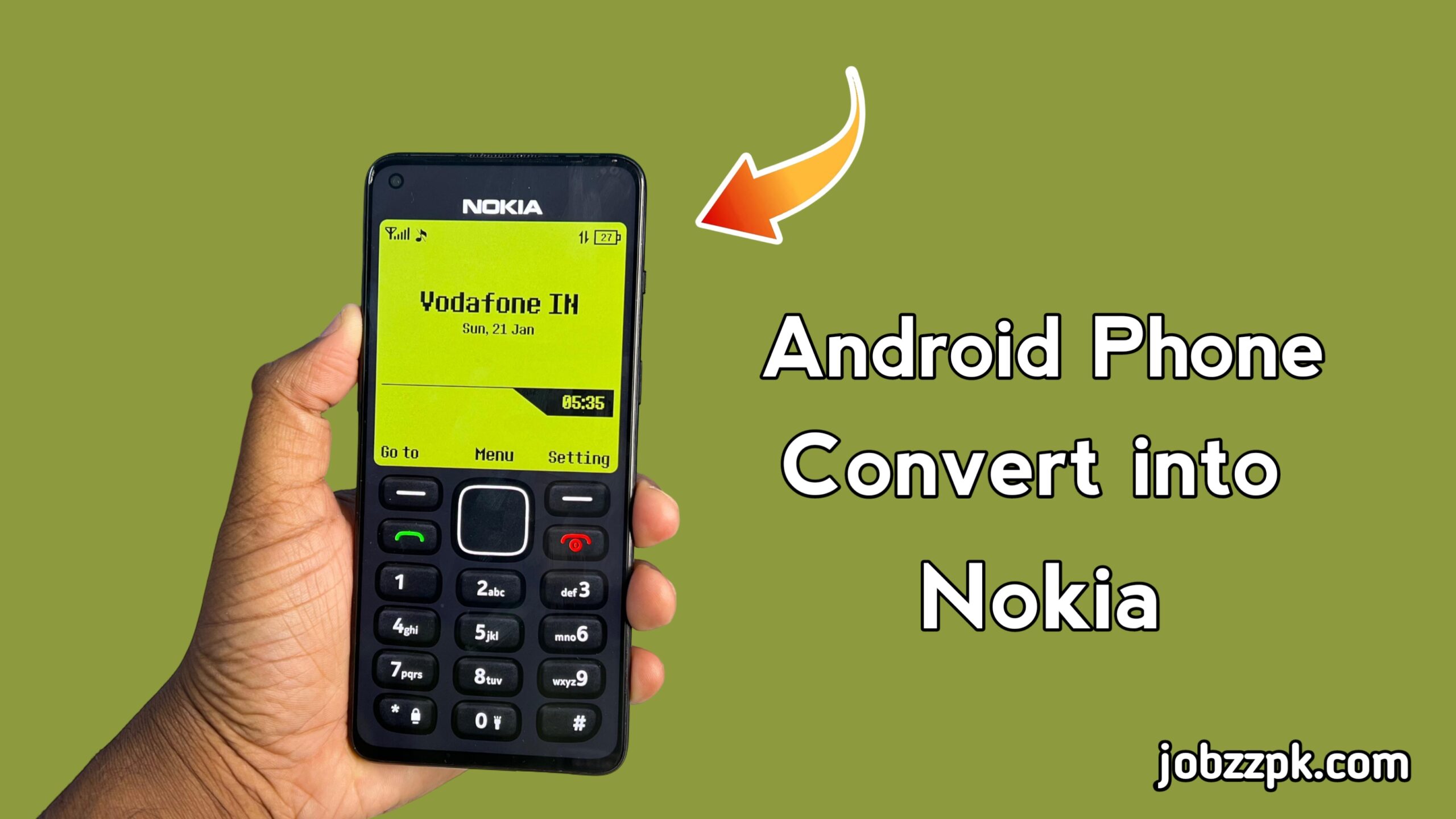
Smartphones have come a long way, with modern devices offering advanced features, high-resolution cameras, and powerful processors. But many people still feel nostalgic about the simplicity and reliability of older phones, like the iconic Nokia 1280. If you’re someone who misses the classic Nokia experience, the Nokia 1280 Launcher is a perfect way to bring that nostalgic feel to your modern smartphone.
This article will explain what the Nokia 1280 Launcher is, how it works, its features, benefits, and why it is a great addition for Android users who love retro phone experiences.
What Is Nokia 1280 Launcher?
The Nokia 1280 Launcher is an Android launcher app that transforms the interface of your smartphone to resemble the classic Nokia 1280 mobile phone. It recreates the simple menu design, icons, and even some of the classic features that made the Nokia 1280 one of the most popular phones in its time.
Unlike traditional launchers that only change icons or wallpapers, the Nokia 1280 Launcher focuses on giving users the full Nokia phone experience. From the keypad layout to the minimalistic menu, it allows you to enjoy the simplicity of a classic Nokia phone on your Android device.
How Does Nokia 1280 Launcher Work?
Using the Nokia 1280 Launcher is simple:
- Download and Install – The launcher can be downloaded safely from trusted sources like the Google Play Store.
- Set as Default Launcher – Once installed, you can set it as your default launcher to replace your phone’s current interface.
- Experience Classic Nokia Layout – Your phone menu, icons, and even certain features will appear just like the original Nokia 1280.
- Customize Options – Some launchers offer customization like font size, theme color, and sound effects to enhance your retro experience.
By using a classic Nokia-style interface, the launcher delivers a simple and distraction-free smartphone experience.
Key Features of Nokia 1280 Launcher
The Nokia 1280 Launcher comes packed with features that make it unique and appealing to both nostalgic users and modern smartphone owners:
- Classic Nokia Menu
The launcher replicates the old Nokia 1280 menu, complete with simple navigation and clear icon design. This makes it easy to find apps and access settings without overwhelming options.
- Retro Keypad Interface
You can enjoy the familiar keypad layout on your smartphone screen, giving you that old-school Nokia typing experience.
- Lightweight and Fast
The launcher is designed to be lightweight, so it doesn’t slow down your phone. Even on lower-end devices, it works smoothly.
- Minimalistic Design
Unlike modern launchers that are packed with features and widgets, the Nokia 1280 Launcher keeps your home screen clean and minimal, helping you focus on the essentials.
- Customization Options
Some versions allow you to tweak wallpapers, fonts, and icon sizes, so you can slightly modernize the look while keeping the retro feel.
Benefits of Using Nokia 1280 Launcher
Using the Nokia 1280 Launcher offers several advantages:
- Nostalgic Experience
If you grew up using Nokia phones, this launcher lets you relive the memories of your first mobile phone. The retro interface brings back a sense of nostalgia.
- Simple and User-Friendly
Unlike modern smartphones that can feel overwhelming, the Nokia 1280 Launcher simplifies navigation and makes your phone easier to use.
- Boosts Productivity
With fewer distractions, less flashy animations, and minimal widgets, this launcher can help you stay focused and use your phone more efficiently.
- Lightweight Performance
Since it is not resource-heavy, the launcher doesn’t slow down your phone, making it perfect for both new and older Android devices.
- Safe and Trusted
When downloaded from trusted sources like the Google Play Store, the launcher is completely safe and free from malicious software.
Who Should Use Nokia 1280 Launcher?
The Nokia 1280 Launcher is ideal for:
- Nostalgic Users: Those who miss the classic Nokia interface.
- Minimalists: Users who prefer a simple, clean interface.
- Older Adults or Kids: The straightforward design makes it easy for everyone to navigate.
- Low-End Device Owners: Lightweight design ensures smooth performance on older devices.
- Productivity Seekers: Those who want fewer distractions and a simpler home screen.
How to Install and Set Up Nokia 1280 Launcher
Installing the launcher is simple and straightforward:
- Download from Google Play Store – Always use trusted sources to ensure safety.
- Open the Launcher – Tap on the app to open it.
- Set as Default – Follow the prompts to set it as your phone’s default launcher.
- Customize if Needed – Adjust font size, wallpapers, or sounds to your preference.
- Enjoy Classic Nokia Interface – Navigate your phone just like the old Nokia 1280.
Conclusion
The Nokia 1280 Launcher – Experience Nokia Phone on Your Smartphone is the perfect choice for anyone who wants to relive the simplicity and charm of classic Nokia phones. It combines nostalgia with modern functionality, offering a lightweight, distraction-free interface while keeping your device secure.
Whether you are a longtime Nokia fan or just someone looking for a simpler, more productive smartphone experience, the Nokia 1280 Launcher is worth trying. With just a few taps, you can transform your modern Android device into a classic Nokia 1280 experience, enjoying the old-school look and feel every day.